
Many infrastructure teams rely on powerful CLI tools. However these tools are often limited to experts who already understand the commands and workflows. At scale this creates a gap between capability and accessibility.
IBM Watsonx Orchestrate lets you build AI agents that can call tools through natural language. Instead of rewriting those tools, you can wrap your existing binaries as Python tools and expose them directly to Watsonx.
User -> Watsonx Agent -> Python Tool (@tool) -> CLI Binary -> Output -> Agent -> User
The Problem
At River Point Technology, we have migrated many Terraform Enterprise organizations to HCP Terraform, spanning more than 1,500 workspaces. Our solutions architects have developed a custom CLI to handle complex migration steps with copying workspaces, variables, state files, teams, and policy sets between organizations. The CLI works well, but it assumes command-line fluency. We wanted the same migration engine available through a guided, conversational workflow so more teams could run tasks safely.
How Watsonx Tools Work
Watsonx tools are Python functions decorated with @tool from the ibm_watsonx_orchestrate SDK. Tool functions are a thin wrapper that takes agent-supplied parameters, maps them to your binary's flags and environment variables, executes the command with subprocess, and returns output for the agent to summarize. The agent reads the function and docstring to understand what the tool does and when to call it. To deploy a tool, package your Python file, dependencies, and (in our case) the compiled binary, then upload everything with the orchestrate CLI.
Prerequisites
Before you start, make sure you have:
- Python tool code using the ibm-watsonx-orchestrate SDK
- A Linux build of your binary (watsonx sandbox runtime is Linux)
- orchestrate CLI access configured for your Watsonx tenant
Writing a Tool That Wraps a Binary
Here is a trimmed-down version of our skill. The full file has 25 tools covering the list, copy, lock, unlock, validate, and core migration commands.
import os
import stat
import subprocess
from pathlib import Path
from ibm_watsonx_orchestrate.agent_builder.tools import tool

BINARY = Path(__file__).parent / "skybridge"

def run(args: list[str]) -> str:
    BINARY.chmod(BINARY.stat().st_mode | stat.S_IEXEC | stat.S_IXGRP | stat.S_IXOTH)
    result = subprocess.run(
        [str(BINARY), "--json", *args],
        capture_output=True,
        text=True,
        env=os.environ.copy(),
    )
    if result.returncode != 0:
        return f"[exit {result.returncode}]\nSTDOUT: {result.stdout}\nSTDERR: {result.stderr}"
    return result.stdout or result.stderr


@tool
def skybridge_copy_workspaces(
    src_token: str,
    dst_token: str,
    src_org: str,
    dst_org: str,
    src_hostname: str = "app.terraform.io",
    dst_hostname: str = "app.terraform.io",
    dst_project_id: str = "",
    workspaces: str = "*",
) -> str:
    """Execute skybridge to copy workspaces from the source org to the
    destination org and return the results immediately.
    Pass workspaces as a comma-separated list of names (e.g. 'ws1,ws2,ws3') or leave as '*' to copy all workspaces."""
    workspace_args = ["--workspaces", workspaces] if workspaces and workspaces != "*" else []
    return run(["copy", "workspaces", *workspace_args])
A few patterns matter in production:
- Co-locate the binary. We compile Skybridge for Linux (because Watsonx sandbox runs Linux) and place it in the same package directory.
- Docstrings are part of your API contract. Watsonx reads docstrings to decide when and how to call tools, so be explicit about required inputs, expected format, and side effects.
- Sandbox resource limits. Long-running operations and large state transfers can hit execution timeouts. We have seen this in high-volume state copy scenarios. We solved this by splitting operations into smaller batches and allowing the LLM to execute these through agent instructions.
Building and Deploying
Deployment is two steps. First, compile the binary for Linux (the Watsonx sandbox target).
GOOS=linux GOARCH=amd64 go build -ldflags="-s -w" -o watson_skill/skybridge_package/skybridge .
Then upload the tool to Watsonx:
orchestrate tools import -k python \
  -f watson_skill/skybridge_package/skybridge_skill.py \
  -r watson_skill/requirements.txt \
  -p watson_skill/skybridge_package
The flags break down as follows:
-k pythontells Watsonx this is a Python tool-fpoints to the skill file containing@toolfunctions-rpoints to your requirements file (ours just hasibm-watsonx-orchestrate)-ppoints to the package directory, including the compiled binary
After import completes, the tools are available to any configured agent. Watsonx picks up function signatures, docstrings, and parameter types automatically. You do not need to redesign your system to get value from AI agents. In many cases, a thin wrapper plus a well-defined interface is enough.
Using It
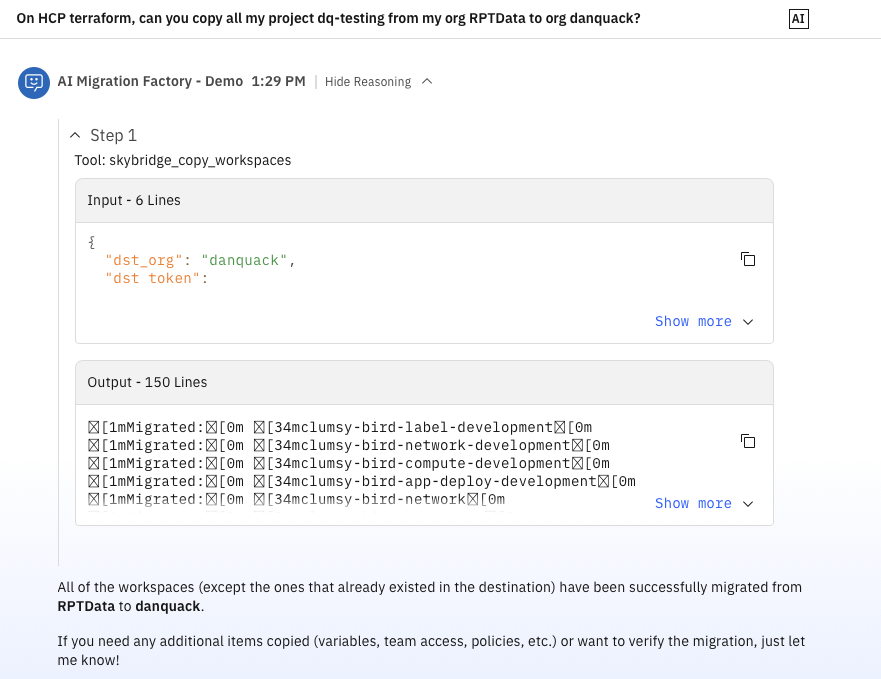
Once deployed, you can ask:
- "List all workspaces in the acme-prod org."
- "Copy workspaces ws-api and ws-frontend from old-org to new-org."
The agent chooses the right tool, asks for missing parameters, and runs the command.
Security Considerations
When you expose infrastructure operations through AI tools, guardrails matter:
- Use short-lived credentials and least-privilege scopes. For more secure connections, consider using orchestrate connections.
- Redact sensitive values from stdout/stderr before returning output
- Keep destructive operations explicit in docstrings ("This action modifies...")
- Add approval gates for high-impact operations.